
Redesigned a broken Webflow platform into an intuitive trainer management system.
Overview
My goal was simple: make the platform usable, clear, and motivating for trainers and their clients.
Metric Mate’s old platform

Trainers struggled to manage clients efficiently.
- Planning sessions took 15–20 minutes per client
- Progress was hard to explain using numbers and tables
- Trainers used 3–5 different tools to do basic tasks
- Missed reminders led to missed sessions and lower retention
The platform was slowing trainers down instead of supporting them.
Create a system that helps trainers:
- Plan sessions faster
- See and share progress clearly
- Manage everything from one place
- Look professional in front of clients
Role
UX/UI Designer & Researcher
Responsibilities
End-to-End Design Process, User Research, Prototyping
Timeline
12 Weeks
Team
Co-Lead, Team of 3
Design Methodology
I followed a structured ‘Double Diamond‘ design process to ensure user-centered solutions and measurable outcomes.
Discover
Conducted user interviews with 12 personal trainers to understand pain points, workflows, and current tool frustrations.
Define
End-to-End Design Process, User Research, Prototyping
Develop
Created low-fidelity wireframes and prototypes, testing with trainers to validate user flows and information architecture.
Deliver
Delivered final designs with comprehensive testing results showing 85% task completion improvement and high user satisfaction.
Discover
Metric Mate platform’s pain points identified
Trainers were abandoning MetricMate for pen and paper. The platform was confusing, buggy, and made their work harder instead of easier.


Broken Interface
No Design System
Confusing Navigation
User Abandonment
Poor User Experience
How we measured – 3 moderated usability rounds (n=12), planner-duration logs in a limited rollout (12 weeks, n=25), SUS + retention pulse.
85% of trainers use 3+ tools; planning takes 15–20 min/client.
Visual progress beats numeric tables for clarity and engagement.
Missed reminders → missed sessions → higher churn risk.
Alex (gym trainer, 25 clients) & Sarah (independent, 15 clients) guided scope and IA.
Team & I analyzed existing trainer management platforms to understand market gaps and identify opportunities for MetricMate’s differentiation.

TrainerRoad
Cycling training app
Strong workout library
Performance analytics
Complex interface
Limited client communication

MyFitnessPal
Fitness tracking app
Huge user base
Fitness + food tracking
Trainer tools limited
Poor data visualization

Trainerize
Fitness app
Client management focus
Mobile app included
Outdated interface
Limited customization
Key insights – MetricMate’s Opportunity
- Focus on trainer workflow efficiency
- Clean, modern interface
- Smart insights and AI recommendations
Define
Problem Statement –
Trainers can’t quickly plan sessions or demonstrate client progress; fragmented tools and poor IA inflate admin time and undermine retention.
Hypotheses –
If we (1) make progress visual, (2) collapse planning into reusable templates, and (3) surface reminders in-flow, then time-to-plan drops and satisfaction rises.
Success metrics –
Planning time: reduce median time per client by ~60% (measured with activity logs).
Task completion: reach 85% first-attempt completion in usability tests (n≈12).
Usability (SUS): improve from 53 → 78 after design changes.
Adoption/retention signals: increase weekly active use during a 12-week pilot (n≈25).
Scope –
Dashboard: one-glance progress + alerts.
Planner: faster weekly setup with templates.
Progress view: clear visuals for trends and milestones.
Messaging: quick follow-ups and reminders from the same screen.
How we measured – Logs: median planner time per client — pre vs. pilot (12 weeks, n=25) • Usability: 3 moderated rounds (n=12) — task success & errors • SUS: standard 10-item scale — pre/post comparison (53 → 78)

Alex Jackson
Gym Trainer
Age: 32 • Experience: 8 years • Clients: 25
Goals –
- Scale business to 40+ clients
- Reduce administrative overhead
- Improve client results and retention
Pains –
- MetricMate platform kept crashing during sessions
- Confusing navigation made simple tasks impossible
- Inconsistent design made platform look unprofessional

Sarah Martinez
Independent Personal Trainer
Age: 28 • Experience: 5 years • Clients: 15
Goals –
- Build a personal training side business
- Provide better client experience
- Track client progress effectively
Pains –
- MetricMate interface was too complex and buggy
- Couldn’t complete basic tasks without errors
- Platform made her look unprofessional to clients
User Journey : Weekly Progress Check
Current State (Before MetricMate) Manual & fragmented
Gather Data
Search through notebooks, apps 🥵
Frustrated
Manual Analysis
Calculate progress manually ⏰
Time-consuming
Contact Client
Schedule call or meeting 😰
Anxious
Discuss Progress
Verbal explanation 🤔
Uncertain
Update Records
Manual data entry 😫
Exhausted
Future State (With Metric Mate) Automated & unified
View Dashboard
All data in one place 😊
Confident
Auto Analysis
Visual progress charts ⚡
Efficient
Share Progress
Send visual report instantly 📤
Professional
Client Celebrates
Clear visual achievements 🎉
Motivated
Auto Update
Data syncs automatically 😌
Relieved
MetricMate Trainer Dashboard – Primary Site Map
- KPI Cards: Revenue, Active Clients, Sessions Today, Retention
- Performance Trends
- Quick Actions: Add Client, Schedule, Message
- Upcoming Sessions
- Client Leaderboard
- Alerts & Notifications
- Recent Activity
- Add Client
- List / Grid
- Search & Filters
- Export
- Bulk Actions
- Sort: Name · Progress · Last Session
- Profile View
- Edit Profile
- Message
- Schedule Session
- Progress Charts
- Add Notes
- New Template
- Categories Filter
- Search
- Duplicate
- Edit
- Delete
- Preview
- Assign to Client
- Browse Library
- New Session
- Calendar Toggle
- Status Filter: Upcoming · Completed · Cancelled
- Reschedule
- Cancel
- Session Notes
- Send Feedback
- Export Data
- Templates Quick Access
- Generate Report
- Date Range
- Report Type: Revenue · Client Progress · KPIs
- Export: PDF / Excel
- Custom Builder
- Share
- Auto-Schedule
- Compose
- Search
- Mark Read / Unread
- Archive
- Send Feedback
- Attach File
- Message Settings
- Notification Prefs
- Save Profile
- Change Photo
- Edit Certifications
- Update Rates
- Theme: Dark / Light
- Notification Settings
- Privacy
- Account
- Backup Data
- Export Settings
- Edit Profile
- Update Specialties
- Add Certification
- Client Stats
- Performance Analytics
- Photo Upload
- Edit Bio
- Update Contact
- Global Search (header)
- Notifications (system-wide)
- IM Widget (anywhere)
- Task Management (integrated)
- Client Leaderboard (Dashboard)
- KPI Analytics (Dash & Reports)
- Feedback System (Msgs & Sessions)
- Alert Panels (Dashboard)
- Profile Management (Settings)
Develop
Through rapid sketches I refined the dashboard layout, focusing data visualization and progress tracking


Dashboard

Progress Tracking

Client Profile

Session Management

12
Trainers Tested
Across 3 iterations
85%
Task Completion
On first attempt
13
Key insights
Implemented in design
Major Findings
- 11/12 trainers want progress tracking very visual than reading numbers or details
-
All trainers wanted to see feedback after every session
- 8/12 trainers said they like clean dashboard and not too busy with lot of unnecessary features that they wont use anytime
- Trainers said they need continuous real time reminder for next session as sometime they lost track of time
Design Changes Made
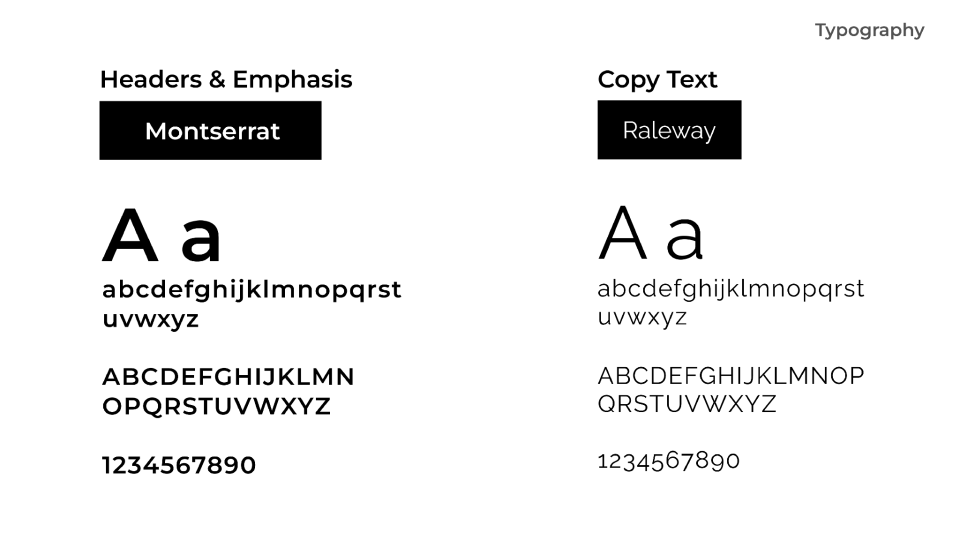
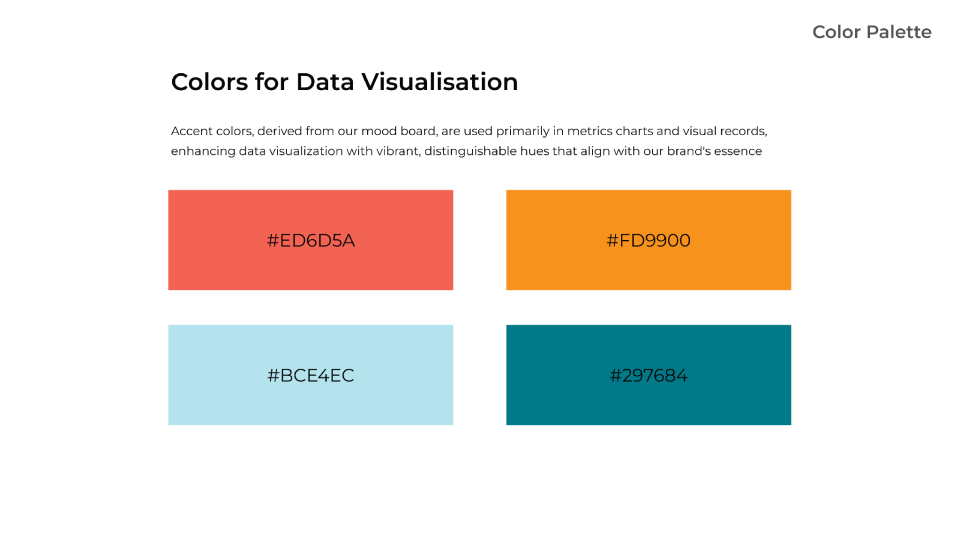
- Built cohesive brand style with clean typography
- Removed the features that are not voted most determined by research
- Added feedback functionality on demand of most trainers
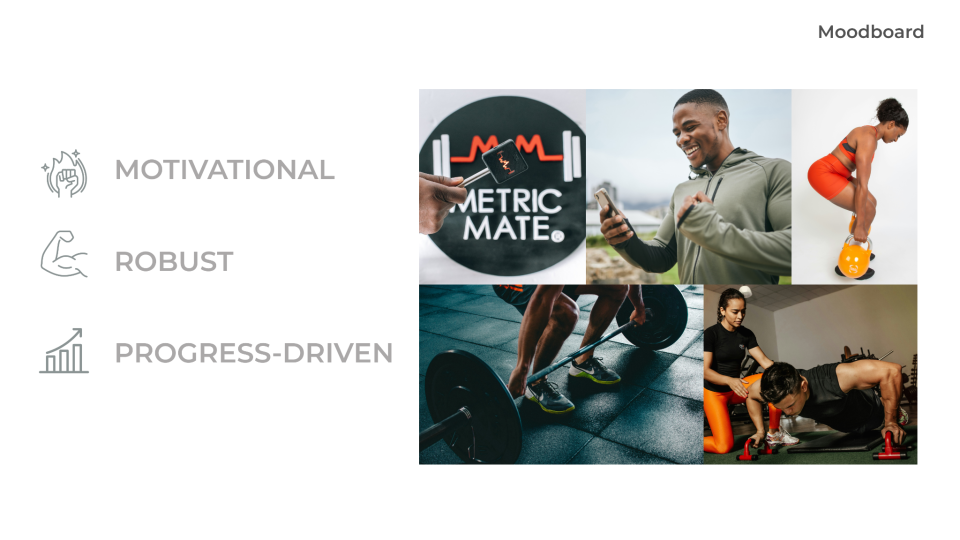
When it came to hi-fi wireframes as a lead UI I wanted to have consistent brand established to Metric Mate I started with Mood board and moved ahead with right brand direction.

Deliver
The MVP delivered a cohesive training platform that seamlessly integrates all client management workflows
Handoff
What devs received :
-
Figma component library + tokens (type scale, color, spacing) with usage notes
-
Redline specs & state maps (hover, focus, disabled; loading, error, empty)
-
18 JIRA tickets with acceptance criteria (Dashboard, Sessions, Progress, Messaging)
-
QA checklist for empty states, validation, keyboard/focus paths
Annotations :
- Included annotated screenshots for key screens (spacing, grid, component variants) so engineers could build 1:1 without guesswork.
Collaboration cadence :
- Weekly office hours with engineering + async Figma comments; decisions captured in tickets for traceability.

Business Impact
~60% ↓
Admin time / session
% → +30%
Client Retention
46% → 85%
Task Completion
+13
Referrals
53 → 78
SUS
“Anjali’ & team transformed our platform from unusable to essential. The interface is now intuitive, the visual hierarchy guides users naturally, and trainers actually want to use our system. Her design thinking elevated our entire product.”

Ecleamus Ricks Jr
Product Owner at Metric Mate, Inc.
“My clients actually ask to see their charts now. One client said ‘This makes me feel like a real athlete.’ That’s the kind of motivation you can’t fake.“

Mike Rodriguez
Personal Trainer
Conslusion
MetricMate demonstrates how thoughtful UX design can transform chaotic business processes into streamlined workflows that trainers actually want to use.
Next Steps :
- Build deeper insights dashboard showing client retention patterns and revenue forecasting
- Create simple mobile app for trainers to quickly log sessions on-the-go
- Connect with popular fitness apps and payment processors for seamless workflow
- Test with larger gyms and franchise operations to validate enterprise readiness
Lesson Learned :
-
Keep it simple: Trainers value speed and clarity over advanced features
-
Test early and often: Real trainer feedback shaped every major design decision
-
Visual hierarchy matters: Clear buttons and readable text prevent user frustration
-
Solve real problems: Focus on actual pain points, not impressive technology

Open to new role, open to relocate, No sponsorship required.

Your feedback & critiques are welcome!
Let’s Collaborate
Choose the option that works best for you.